The coding agent that shows you everything.
We show you tool calls, file changes, and costs as they happen, so you can guide your agent with full context. It's your session; you should see all of it.
Free to start — $10 in credits*, no card required. macOS only. Windows coming soon.
Powered by





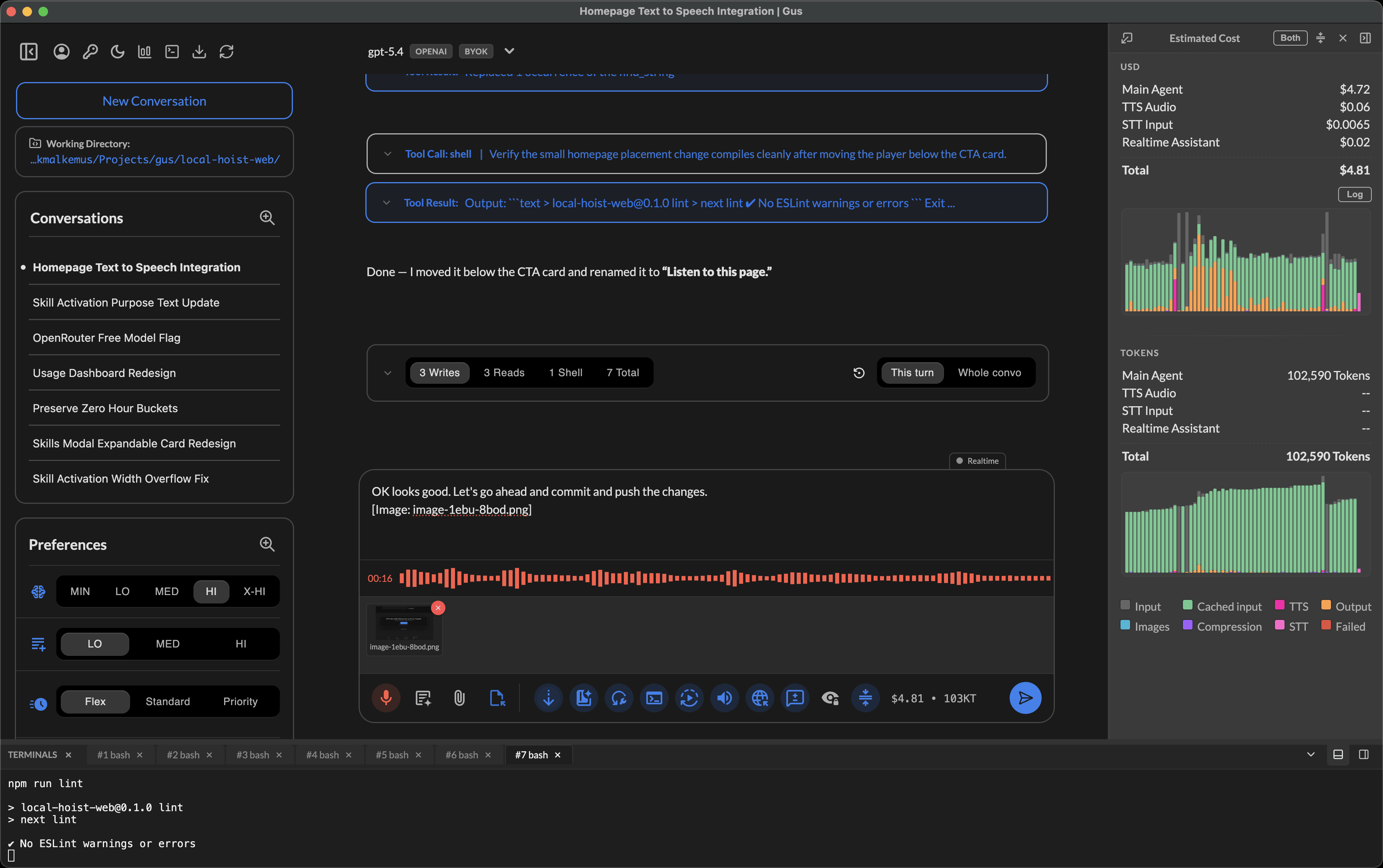
EVERYTHING YOU NEED, NOTHING HELD BACK
Voice, search, sub-agents, rollback — all built in.
Talk to your AI and hear it respond. Search across hundreds of conversations in under a second. Spawn dedicated sub-agents for research and coding. Roll back code, conversation, or both, independently, from any message.
NATIVE VIDEO GENERATION
Generate cinematic video from the chat.
Turn prompts and references into polished motion assets without leaving Local Hoist. Explore product clips, animated worlds, concept shots, and visual experiments, then preview, copy, and reuse generated videos with short media IDs in later prompts.
- Create video with fal.ai models including Seedance 2.0 and Happy Horse
- Use prompts, images, local files, and generated media as references
- Activate /video-prompting to turn Gus into a video prompt-writing expert
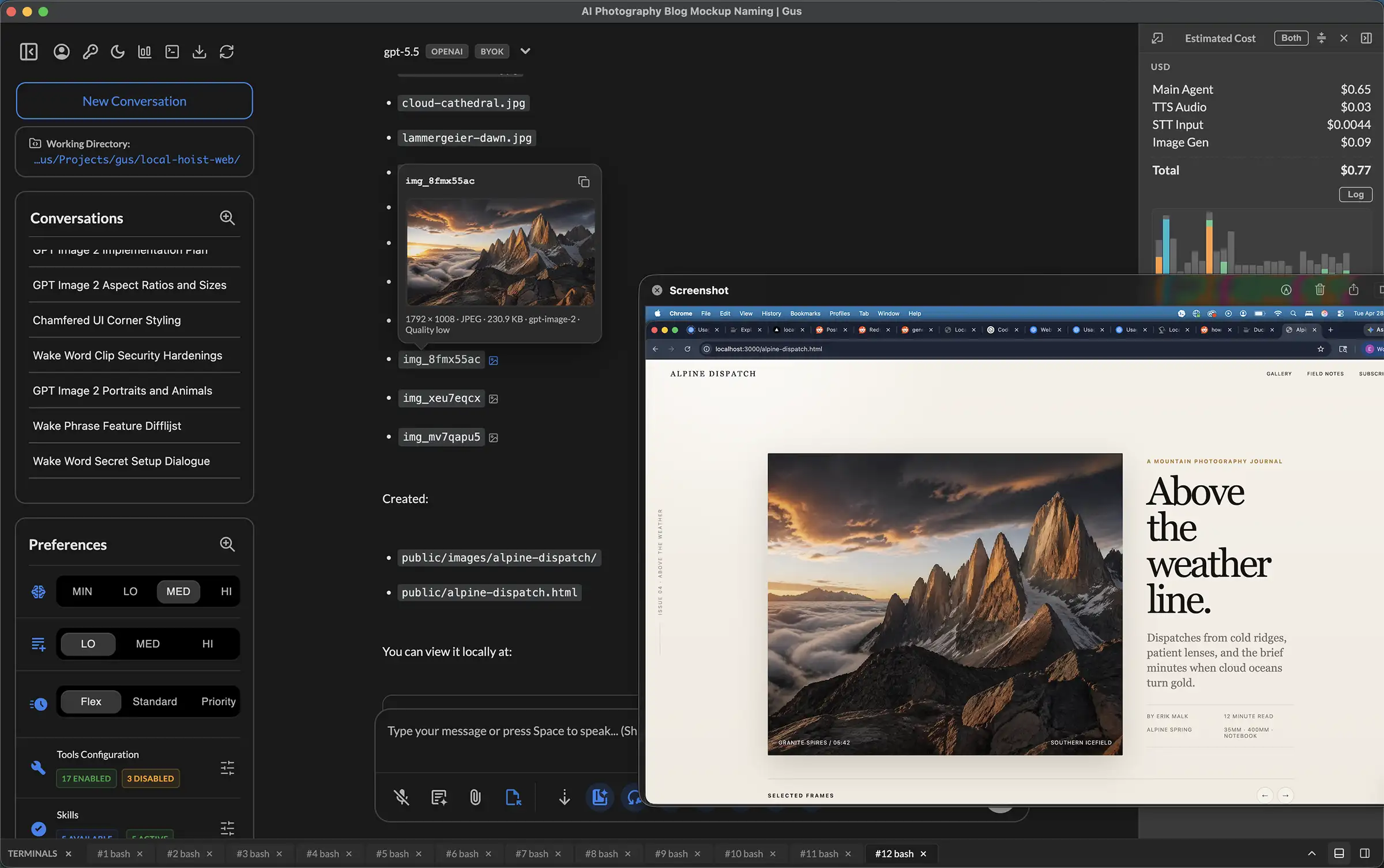
NATIVE IMAGE GENERATION
Generate and edit images from the chat.
Ask Gus for product mockups, blog art, icons, or variations without leaving Local Hoist. The native image tool can create from a prompt, edit existing images, compare results in the conversation, and save the best asset into your app or website. Explore with low quality, then rerun the chosen prompt at medium or high when the asset needs polish.
- OpenAI GPT Image 2, Google Gemini Nano Banana Pro, and Nano Banana 2
- Generate from scratch or edit an existing image
- Review results in chat, iterate, then use the best asset in your project
BUILT-IN VOICE
Talk to your AI. Hear it respond.
Speech input that works the way you actually think. Start typing, switch to recording, upload images mid-sentence, and browse your project while narrating. It all flows into one message. When the AI finishes its turn, hear the summary read aloud so you stay in sync with the code instead of skimming past it. Toggle TTS on or off, adjust speed from 0.75× to 2×, and skip forward or back with hotkeys.
- Mix typing, recording, and image uploads in a single message
- TTS keeps you in the loop, so you can hear what changed without reading walls of text
- Playback speed, skip controls, and voice customization via hotkeys
REAL-TIME COSTS
See what every message costs.
A live cost panel tracks your running total in USD or tokens, updated after every message. Hover any bar to see the per-message breakdown for input, cached input, output, images, TTS, and compression. Set daily and monthly spending limits with hard stops.
- Toggle between USD and token views
- Per-message cost breakdown on hover
- Daily and monthly spending limits
BUILT-IN VERSION CONTROL
Roll back code, conversation, or both.
Other tools offer checkpoints that leave you guessing what will revert and hoping nothing else breaks. Local Hoist snapshots every file change before and after, with a purpose statement explaining what happened and why. Roll back to any point in the conversation, preview exactly which files and lines will change, then confirm or cancel. Roll forward just as easily. It even captures your manual edits, so undoing a rollback truly restores the state you had, not just what the agent knew about.
- Preview every file and change before confirming, with no surprises
- Granular to individual tool calls, even mid-turn
- Captures external edits so undo rollback is a true undo
STAY LEAN AUTOMATICALLY
See exactly what was compressed, and undo it.
Three compression methods (heuristics, AI rewrites, and full summarization), each highly tunable so you stay in control. Set the threshold for when auto-compression kicks in, or turn it off entirely. Toggle between the compressed view the model actually sees and the original messages you sent. See per-event stats like cost and characters saved by each method, so you know exactly what changed. Close to solving a hard problem? Undo the compression in one click and let the context grow.
- Auto-compression with configurable threshold, or turn it off
- Toggle between compressed and original conversation views
- Per-event stats and one-click undo when full context matters
FULL TRANSPARENCY
Observable tool calls.
Expand file reads, writes, shell commands, and searches to see the parameters sent and the result returned. Reject a tool call and provide feedback to the model. Enable, disable, or configure tools individually.
- Expand tool calls to inspect inputs and results
- Reject with feedback to redirect the model
- Enable, disable, or configure tools individually
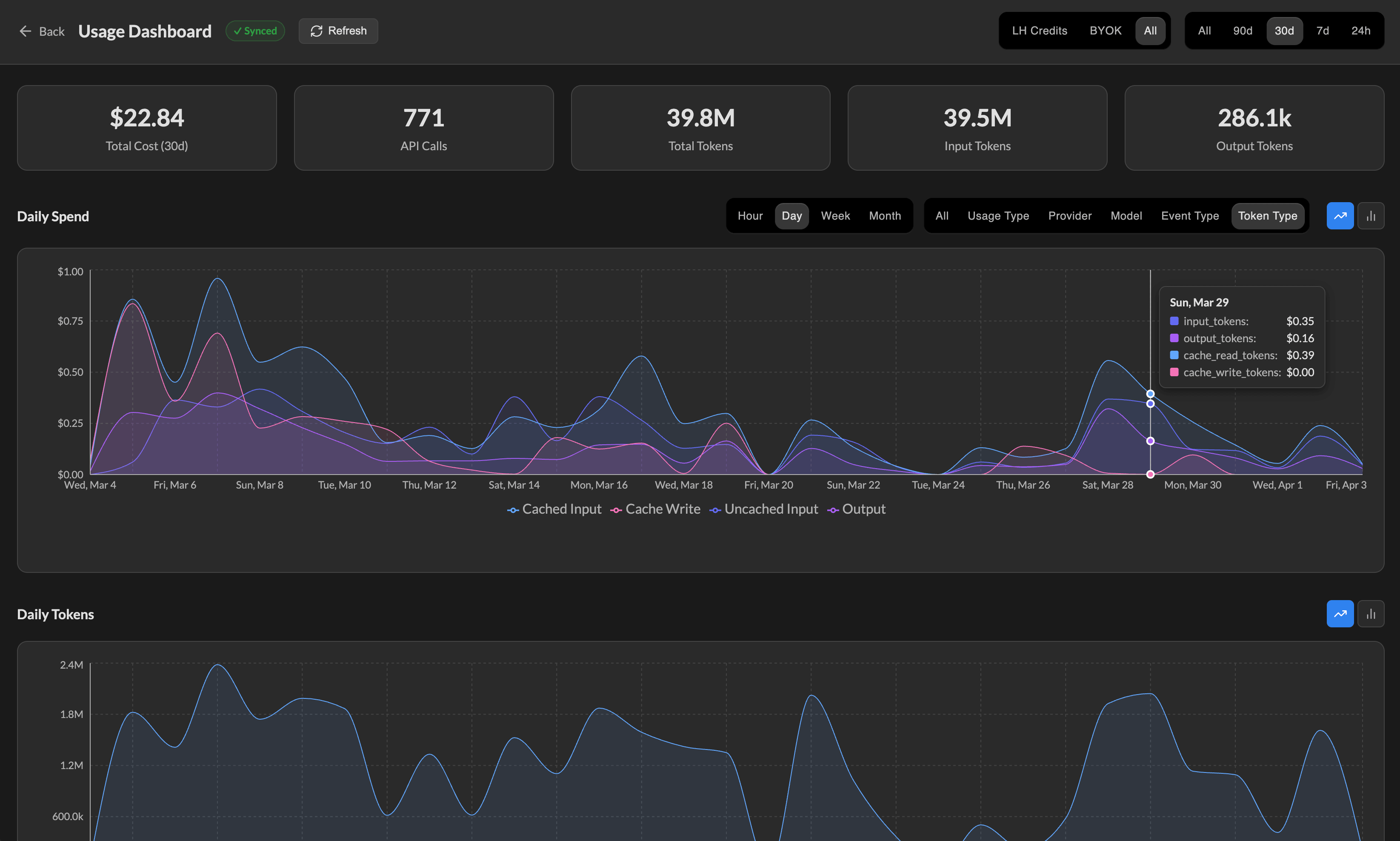
TRACK YOUR SPENDING
Slice spend and tokens every way that matters.
The usage dashboard goes far beyond a single total. Filter by LH Credits, BYOK, or combined cost. Switch between 24h, 7d, 30d, 90d, and all-time views. Chart usage hourly, daily, weekly, or monthly, then break it down by usage type, provider, model, event type, or token type.
- LH Credits, BYOK, or combined cost views
- 24h to all-time ranges with hourly, daily, weekly, or monthly charts
- Breakdowns by usage type, provider, model, event type, and token type
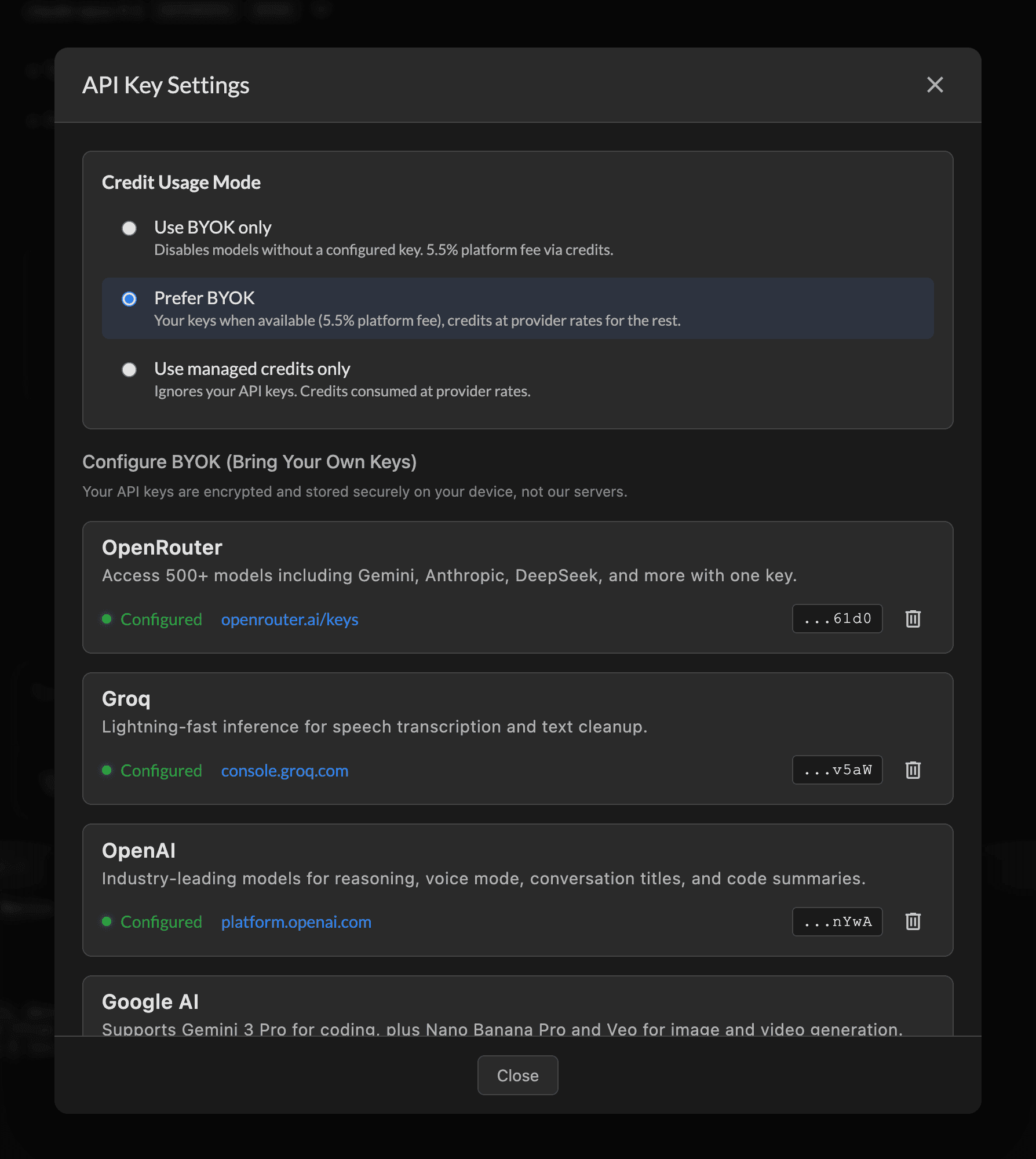
MODEL CHOICE, YOUR TERMS
Choose from major providers and hundreds of models.
Use OpenAI, Anthropic, Google, Groq, and hundreds of additional models through OpenRouter from one app. Use managed credits for simplicity, bring your own keys for control, or mix both with Prefer BYOK. Provider keys are encrypted and stored on your device, never on our servers.
- Hundreds of supported models across major providers
- Managed credits, BYOK, or Prefer BYOK
- Keys encrypted and stored locally on your device
FIND PREVIOUS WORK SESSIONS EASILY
Search across every conversation.
Over 800 conversations and growing? No problem. Search by title, user message, or assistant response to find exactly what you need. Filter by content type when titles aren't specific enough. Results appear in about a second, even across thousands of messages.
- Search by title, user messages, or assistant responses
- Filter by content type for precise results
- Sub-second results across hundreds of conversations
DELEGATE THE LEGWORK
Dedicated agents for research and coding tasks.
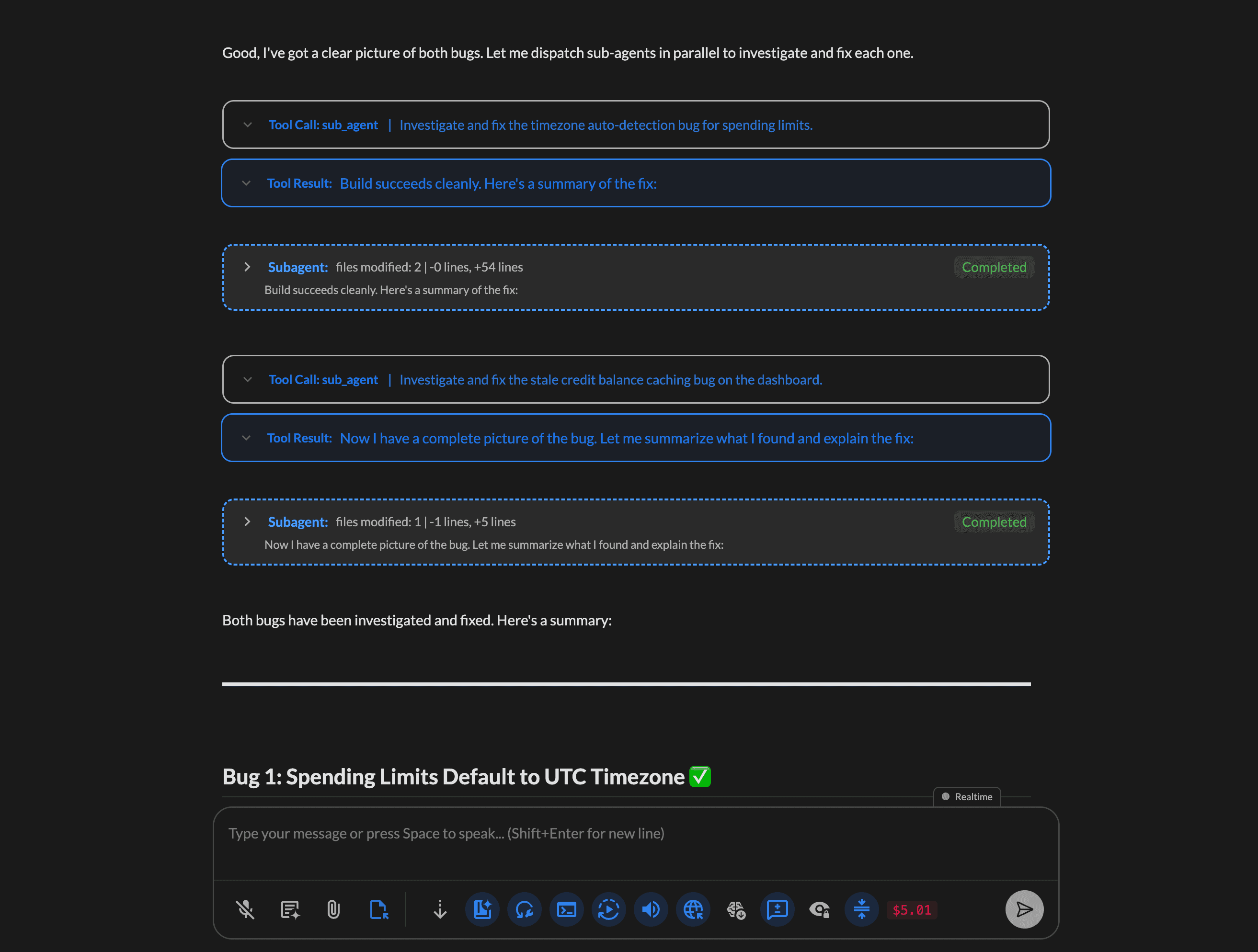
Spawn sub-agents for local codebase research, web research, or complex coding tasks. Each runs in its own context and reports back to the main conversation. Pause, resume, or roll back any sub-agent. View a summary of every file changed.
- Local research, web research, and coding agents
- Pause, resume, and roll back from the main thread
- Full file change summaries on completion
UNDER THE HOOD
The more you see, the better you steer.
Most AI coding tools give you the output and hide the process. Local Hoist shows you everything, the system prompt, every tool call, every response, and every file change, because we think being in the loop makes you a fundamentally better user. When you understand the context the AI is working in, you build better intuition about why it's coding the way it's coding, when to correct it, and when to let it run. That's true whether you're a professional shipping production code or a beginner building your first project.
See the full picture
Every action the AI takes is visible and expandable, file reads, writes, shell commands, and searches. You can reject any action with a note, and the AI adjusts on the spot. Nothing is hidden behind an abstraction layer.
Stay in the loop with voice
Listen to the AI summarize its work while you review diffs and test code. When you spot something, a bug, a style issue, or a better approach, just turn on the mic and start talking. Narrate what you see, grab a screenshot, paste it in, and keep going. No context switching.
Build real intuition
The more you watch the AI work, the better you get at working with it. You'll start to notice patterns, why it picks certain approaches, where it tends to stumble, and when to step in. That understanding compounds over time, whether you're using AI to write code or building AI into your own software.
LATEST RELEASES
Keep up with what's new in Local Hoist.
A quick look at recent product updates, with a clean path to the full release notes.
Latest release
v0.4.6
October 6, 2026A new Media library brings images and videos from your conversations into one place. This release also adds lighter media previews, improved image viewer controls, and fixes for conversation activity displays.
v0.4.5
October 4, 2026Introducing GPT Live and redesigned app navigation. Talk with your assistant while it works, keep common controls within reach, and use new chat, image, and video models.
v0.4.4
September 8, 2026Introducing tool result tightening, tracked shell changes, and Linear issue updates inside conversations. This release also expands Mobile Remote controls, improves MCP setup and media inspection, and brings Windows closer to public release.
View all release notes$10 in free credits when you sign up. No card required.*
No subscription. Start coding for free, then buy credits as you go.
Currently available for macOS. Windows coming soon.
* Free credits are available to eligible new users only. See Terms of Service.